Use directional cues to guide visitor attention
Directional cues guide the visitor’s eye toward your CTA. Learn how to use gaze, arrows and visual flow to create a clear path to conversion.
This is tip #6 in an 8-part Ultimate Guide to Conversion Optimization. Want the full guide delivered to your inbox?
Get it here →
Your landing page might have the right offer, the right layout, and even strong copy - but if you’re not visually guiding your visitor’s eye to the action, you’re leaving conversions on the table.
Directional cues are one of the most powerful yet overlooked tools in your CRO toolkit. When used effectively, they help create a visual path to conversion.
Why it matters
Visitors scan before they read. The job of your page is to gently guide that scanning behavior toward your CTA. Directional cues make that process effortless.
Without clear visual guidance, your visitors may focus on the wrong areas—or worse, miss your CTA entirely.
The tip in action
Directional cues come in two main forms, and your choice depends on how directly you want to steer the visitor's eye:
Explicit cues
These are the visual elements that deliberately point toward your CTA. They leave no doubt about where attention should go.
Examples of explicit cues:
- Arrows pointing at the CTA
- Lines or shapes leading toward the form or button
- Highlighted UI elements framing the CTA
- Icons or illustrations that direct attention
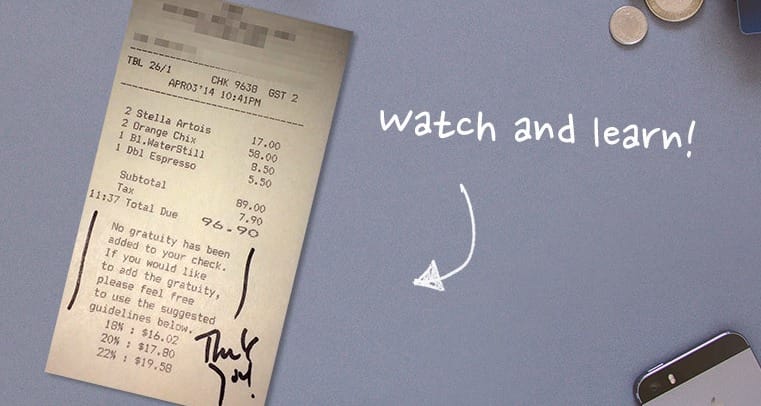
Implicit cues
These cues guide attention more naturally, using composition, gaze, or body language. Visitors follow visual signals instinctively.
Examples of implicit cues:
- A person looking toward the CTA
- Body posture or positioning angled toward the action
- Page layout that flows in the direction of the CTA
- Light, shadow, or background elements subtly guiding the eye

A powerful combination
Some examples combine both explicit and implicit cues in a single visual, creating an even stronger path to the CTA.

Both types of cues work well, and using them intentionally can create a strong visual flow from your headline to your CTA and supporting form.
Why it works
Directional cues reduce decision friction by helping visitors know where to focus. They minimize cognitive effort and make the action feel intuitive.
Used alongside contrast (see Tip #5), directional cues form a powerful one-two punch for visual persuasion.
Used alongside contrast, directional cues create a strong one-two effect for visual persuasion.
Checklist for using directional and visual cues
- Does the cue support the CTA, not distract from it?
- Are explicit cues used deliberately, such as arrows or lines?
- Does an implicit cue guide the eye naturally, like gaze or body angle?
- Are you avoiding decorative arrows, shapes or graphics that add noise?
- Does the image still make sense without the cue, meaning it reinforces rather than compensates?
- Have you tested versions with and without cues, since results can vary by layout?
Key takeaway
Directional cues are powerful because they reduce ambiguity and guide visitors toward what matters. Whether you use an arrow, a subtle line, or a person’s gaze, the job is the same – bring focus to your CTA and remove friction. When used intentionally, these cues make your landing pages clearer, more intuitive, and more likely to convert.

Want all 7 tips in your inbox?
Get The Ultimate Guide to Conversion Optimization – a free 7‑part email series with the most effective CRO tips I’ve learned from 12 years of landing page testing.
Need a second set of eyes on your landing page?
Request a free audit and I’ll personally review one of your demand‑gen pages.